



12 Best Alternatives to Discord for 2026
Not all sites and apps like Discord are built the same. We’ve broken down the top Discord competitors so you can find the one that actually fits the way you communicate.

Since its release in 2015, Discord has amassed an estimated monthly user base of almost 260 million, making it one of the most popular messaging and chat applications in the world. As of 2026, Discord holds an almost 10% share of the U.S. messaging and chat app market, meaning that despite its flaws, it remains an incredibly useful tool for a lot of people. Similar things can be said for many alternatives to Discord, with some options being perfectly suited to professional tasks, while others are best-used to chat with friends and build communities.
The app’s free-to-use status alongside its wide array of user-focused customization features has spurred its adoption across far-reaching audiences. From tabletop and video gamers to business professionals, Discord is now the go-to tool for fast, simple online communications.
But things may not always be this way, and there may be some aspects of Discord’s service that you don’t like or feel are frustrating to use. Whether you’re entirely new to the world of team communication tools or a long-standing chatter looking for a change, in this guide, we discuss some of the leading tool’s downsides and suggest a few brilliant Discord alternatives.
Here are the 12 best alternatives to Discord that you should consider in 2026 and beyond!
Community-building platforms
Discord has gained a reputation as the go-to platform for building gaming and tech-focused communities, but is this still the case in 2026? While the app did lead the way in terms of simplifying and popularizing the creation of hobby-centric chat servers, some newer Discord alternatives boast unique features and functions that might make them a better choice today.
1. Nerd Culture
Nerd Culture is a community-first free Discord alternative designed to help people find the right people, not just more people. Existing options like Reddit threads and Discord servers often go stale, became impersonal, or turned into massive, unfocused pools of strangers. Posts would die without updates. Groups would form and vanish. Servers would grow so large that meaningful connection became difficult. That is where Nerd Culture comes in.
On Nerd Culture, members can search and filter for people locally and globally who want to discuss, play and meet up with people with similar social hobbies. Nerd Culture gives you tools you need to find real people just like you who want to nurture active, evolving, engaging communities focused on the topics and fandoms you love. Instead of you just shouting into a void or scrolling endless posts, Nerd Culture helps you discover people who align with you from day one.
Why choose Nerd Culture?
Choose Nerd Culture if you want a Discord alternative for gamers, hobbyists and fandom groups that provides practical tools to help you find people who share your unique interests and gaming groups that match your preferences. Where websites like Discord optimize for mass growth and constant activity, Nerd Culture optimizes for compatibility and intentional group formation.
- Pros:
- Intentional group-building and compatibility-based connection features allow users to create online and offline communities built around meaningful connections.
- Designed around small-to-medium group building rather than endless feeds or chaotic servers.
- Bridges local and global hobby communities in a structured way
- Cons:
- Requires active participation to get the most out of the service
- Not built for constant ambient chatter
- Pricing: Free to use.
- Focus: Community-first, small-medium scale group building around shared interests.
- Chat types: Discussion posts, threads, replies and live chat features.
- Security: Full control over who you interact with and who is able to see your content.
A Better Discord Alternative to Meet People
2. Discourse
Discourse is an open-source Discord alternative designed to promote long-form, structured public discussions in a modern forum-based environment. The platform is an evolution of the well-known message board style of web forum, only with a central, sequential, chronological feed that’s been optimized for mobile and smart devices to help users navigate on the move.
While Discourse can be used as a Discord-like-app, the service is more tailored towards in-depth discussions that grow gradually over time, with new users adding unique insights as they join the conversation. While this alternative to Discord can lack the immediacy of similar solutions, it excels at turning conversations into lasting knowledge to help build communities.
Why choose Discourse?
Choose Discourse if you’re intending to build communities centered around thinking before reacting. The slow-burning, open-source nature of the platform makes it a great choice for hobbyist, fandom and tech-focused groups who want to build lasting, mindful communities.
- Pros:
- Comprehensive moderation system
- Excellent search features and a focus on quality discourse
- Top tool for building knowledge-based communities.
- Cons:
- Lack of real-time voice and presence-based chat features can make this app feel a little slow / formal
- Not ideal for users looking for immediate group engagement
- Pricing: Hosted plans start at around $20/mo; free to self-host.
- Focus: Intentional, knowledge-focused group building for small-large communities.
- Chat types: Discussion posts, threads, replies and limited private messaging.
- Security: Standard web security, optional 2-factor authentication, no E2E encryption.
Direct Discord competitors
Discord boasts over 655 million registered users for good reason. The Discord app does a lot of things well in terms of accessibility, usability and feature balance, but some users are growing tired of the way the company operates. If you’re looking for a Discord-like app that works similarly but provides users a little more freedom, one of these options might be best.
3. Stoat
Stoat is a real-time chat platform modelled directly after Discord, adhering to the same core principle of communities built on servers, channels and roles. Formally known as Revolt, this Discord-like app was initially designed to mimic Discord as closely as possible, only without the controversial data collection and privacy policies that users have become frustrated with.
In its current form, Stoat is a true open-source, self-hosted Discord alternative, offering much of the same functionality as the original on a system built around privacy and autonomy. The trade off, however, is that as Stoat lacks the large-scale infrastructure of its competitor, it has far fewer bots, integrations and search tools which can noticeably hinder community growth.
Why choose Stoat?
Choose Stoat if you love everything about Discord but Discord itself. Stoat is among the best Discord alternatives for the average user, requiring very little adjustment to achieve a similar experience, but as a result not really doing anything exciting or unique in the chat app space.
- Pros:
- Arguably the most Discord-like app on the market, but with an open-source foundation that allows for greater privacy and more autonomy-focused communities.
- Cons:
- Fewer bots, integrations, bells and whistles than Discord
- More difficult for the average person to grow a large community organically on Stoat.
- Pricing: Free to use; self-hosting available.
- Focus: Community and autonomy-focused; tailored to small-mid-sized communities.
- Chat types: Real-time server and channel-based chat with evolving voice features.
- Security: Privacy-focused with native E2E encryption and role-based access control.
4. Matrix + Element
Matrix is an open-standard protocol designed to support decentralized communication, with Element being a privacy-focused messenger app built into this framework. In practice, this Discord alternative functions similarly to an email for chat platform, enabling users to share text, voice and video content with one another over secure, custom, community-run servers.
The combination of Matrix and the Element client is tailored towards privacy-conscious and tech literate users looking for a streamlined way to chat with friends without any unnecessary distractions. While you’d be hard-pressed to find a Discord-like app quite as secure as a well run Element server, the service’s business-first interface can leave it feeling a little bit sterile.
Why choose Matrix + Element?
Choose Matrix + Element if independence, autonomy and privacy matter much more to you than convenience. This solution offers a secure, encrypted way to chat with people you know from anywhere and at any time, but it isn’t the best place to build fun, engaging communities.
- Pros:
- True end-to-end encryption
- Federated messaging service make this platform an ideal Discord alternative for people who prioritize privacy and security above all else.
- Cons:
- Emphasis on high-level security features can make onboarding a bit tedious for the casual user who may also be put off by the more formal interface.
- Pricing: Free to self-host; paid hosting plans available via Element.
- Focus: A secure space for knowledgeable persons to build privacy-first communities.
- Chat types: Live chat, chatrooms, voice call and video call features.
- Security: E2E encryption by default via Element with a federated messaging system.
Voice chat applications
While Discord does provide fairly well-received voice chat functionality, the platform’s jack of all trades approach to online communication has left some users feeling their voice chat tool is a little lacking. If you’re looking for a site like Discord that places more focus on providing a feature-rich, high quality, live voice chat service, we think you’ll like one of the below options.
5. TeamSpeak
In a way, it’s unfair to call TeamSpeak a Discord alternative as it’s been running in some form since the early 00s. Originally designed as a high-fidelity web chat tool for gaming clans, the modern TeamSpeak platform provides real-time, low-latency voice and text chat functionality to web users worldwide, ranging from gamers and podcasters to professional training groups.
TeamSpeak provides a wide array of customization features to maximize the quality of voice calls, including automatic microphone adjustment, background noise reduction and real-time echo cancellation features. However, wider features are a little lacking, with only limited text chat functionality and no real community-crafting tools to keep users engaged in the platform.
Why choose TeamSpeak?
Choose TeamSpeak if you’re looking for a high-quality, reliable voice chat tool and nothing more. If you mainly use Discord to chat with friends while playing games or taking on other tasks, TeamSpeak will provide an equal or better service, only without wider social features.
- Pros:
- High-fidelity, low-latency voice communication features
- Reliable way to chat in real time with permission systems to promote privacy.
- Cons:
- Minimal text chat and community-focused features and a business-first formal UI can make this Discord alternative feel tedious to use for anything other than calls.
- Pricing: Free client; paid servers available.
- Focus: Organized voice chats for groups of all sizes with minimal wider distractions.
- Chat types: Voice channels and limited text chat.
- Security: Encrypted transport and server-side security features; no E2E encryption.
6. Mumble
Mumble is an open-source, performance-first voice chat platform with a slight focus on tech-minded users. This Discord alternative is designed to provide encrypted, low-latency voice chat functionality over self-hosted servers, with little if any focus placed elsewhere.
This self-hosted Discord alternative excels in its ability to deliver high-quality audio across even the most modest of hardware, with native encryption to help ensure your chats remain private. Where the average user might find issue, however, is in the chat tool’s bare bones interface and lack of any real social features that can leave the platform feeling a bit lifeless.
Why choose Mumble?
Choose Mumble if all you want is a fast, free and reliable way to chat with your friends using basic hardware. Mumble is a Discord alternative in function alone, skipping all of the social and community-building features that some people find distracting or frustrating to navigate.
- Pros:
- Fast, free and efficient open-source Discord alternative
- Offers low-latency voice communications via self-hosted servers with minimal extra feature distractions.
- Cons:
- No dedicated community-building features or natural in-app ecosystem
- Only excels as a high-quality voice chat tool for existing communities.
- Pricing: Free to use; self-hosting available.
- Focus: Streamlined, high-quality voice chat tool for existing small-mid-sized groups.
- Chat types: Voice channels.
- Security: Encrypted transport and certificate-based authentication for private servers.
Real-time messaging
Sometimes, less is more. Not everyone looking for a Discord alternative wants or needs all of the bells and whistles that come with modern communication and collaboration tools. For internet users who are simply looking for a reliable, intuitive and professional application that supports text-based communications in real-time, consider one of these Discord alternatives.
7. Google Chat
Google Chat is a secure and streamlined messaging tool built inside the Google Workspace ecosystem. Anyone with a Google account can use this app like Discord to chat with friends in a text-based format, while Google Workspace users can make use of wider integrations with linked tools like Google Meet and Google Drive to engage in voice chats and share files.
This alternative to Discord can be a great choice for people who already use Google apps on a regular basis, as the interface shares a lot of similarities with wider Workspace tools. For gamers, hobbyists and fandom groups, however, the platform’s lack of community identity and overtly-professional, transactional interface can make it a bit tiresome to use regularly.
Why choose Google Chat?
Choose Google Chat if you already enjoy using Google Workspace alongside the company’s wider apps, or if you like tools with a professional and straightforward interface. If you prefer chat apps like Discord that have native community-building / social features, look elsewhere.
- Pros:
- Pre-integrated chat tool accessible to all Google Workspace users
- Easy to adopt and merge with wider apps for users already in Google’s ecosystem.
- Cons:
- No unique features of note aside from its compatibility with Workspace
- Really only suited to avid users of Google applications.
- Pricing: Free with a Google account, also included in paid Google Workspace plans.
- Focus: A simple and easy-to-adopt work messaging tool for Google account holders.
- Chat types: Text chat and integrations with Google Meet.
- Security: Phishing, malware and spam scanning; basic enterprise security features.
8. Telegram
Telegram is a cloud-based messaging and social media app that many people use as a free alternative to Discord. The basic service allows users to send and receive instant messages, photos, videos and files up to 2GB as well as join public groups and channels within the app.
With a monthly active user base of around 1 billion, this Discord alternative can offer a great platform for growing a community and engaging with a broad audience. Telegram users can also choose to communicate in private through the app, with the tool’s Secret Chat feature allowing users to send end-to-end encrypted messages by default for improved data privacy.
Why choose Telegram?
Choose Telegram as a Discord alternative if you want to grow your audience fast, but aren’t too picky about who joins your community, or if you’re looking for an app you can use to chat with small groups in private without setting up your own encryption or cybersecurity solution.
- Pros:
- Effortlessly handes massive groups and channels makes this Discord alternative a fairly good pick for large-scale community building.
- Cons:
- Lack of moderation tools and less-structured UI can lead to conversation quality degradation as communities grow.
- Pricing: Free to use; optional paid premium subscription.
- Focus: An accessible, streamlined chat tool optimized for large public communities.
- Chat types: Text. group, channel, voice and video chat features.
- Security: Optional 2-factor authentication; E2E encryption only across Secret Chats.
9. Signal
Signal is a free to use, open-source private messaging app focused on privacy and security. Unlike Discord and Discord alternatives like Telegram, all communications sent through the Signal platform are end-to-end encrypted by default, with options to set up group chats for up to 1000 people that support text, voice and video communications, alongside file sharing.
While Signal excels in the fields of privacy and security, the platform is a little lacking in the community-building and social reach departments. There are no discovery features or public spaces within the app, meaning you can only really start chats with users you already know.
Why choose Signal?
Choose Signal if you value privacy and security above social reach and growth. This Discord alternative can be a great option for people who want to chat with trusted friends in a secure environment where they know their data is safe, but can’t really be used to find new friends.
- Pros:
- High-security features like E2E encryption as standard
- Ideal for people who want to keep their data private by all means necessary.
- Cons:
- Group building and community support features are limited by design, making Signal a poor choice for anyone wanting to build and grow a large public community.
- Pricing: Free to use; optional paid backup features.
- Focus: A highly-secure, feature-slim space to chat with small numbers of people.
- Chat types: Text, group, voice and video chat.
- Security: E2E encryption by default, disappearing chats and screenshot prevention.
Professional platforms
In a world where remote and hybrid schedules continue to shape the future of professional industries, real-time communication apps are essential. Whether you’re one of the ≈80% of workers who use collaboration tools daily, or are a business leader looking for a secure and scalable way to keep in touch with remote teams, consider one of these Discord-like apps.
10. Microsoft Teams
Microsoft Teams is an enterprise-level collaboration platform designed to help organizations and professionals share ideas in a remote-access, secure environment. Teams is integrated deeply into the Microsoft 365 ecosystem, allowing the app to essentially act as a digital office space for modern businesses that often have dispersed teams operating all over the world.
Thanks to its high-quality, reliable text and voice chat features, Teams can function as a fairly good Discord replacement, particularly for people who already use Microsoft software on a regular basis. However, as the platform is primarily designed for use in professional spaces, its interface can feel a little alien and overwhelming when used to facilitate non-work groups.
Why choose Microsoft Teams?
Choose Microsoft Teams as an alternative to Discord if you’re looking for a professional tool that can handle basic text and voice chat demands and integrate into your existing Microsoft ecosystem. If what you want is a chat app built for socializing, there are much better options.
- Pros:
- Deep integration with the wider Microsoft 365 ecosystem makes it an ideal Discord alternative for professionals who require a compliant, secure chat tool.
- Cons:
- Lack of socialization features and an at times overly-complicated interface can make this Discord replacement a pretty bad pick for organic community-building.
- Pricing: Free for personal use; tiered pricing for multiple users.
- Focus: A slick and integrable chat tool designed to support workplace collaboration.
- Chat types: Text and voice chat; video meeting and file collaboration features.
- Security: E2E encryption for 1 on 1 calls; customizable admin controls and policies.
11. Slack
Slack is a cloud-based team messaging platform built around channels, threads and smart integrations. Primarily designed for professional use, the idea behind the system is for Slack to replace your existing email system with a persistent, searchable online chat program that can connect to hundreds of wider tools and help you centralize all your essential information.
The ability for Slack to automate the collection of information across multiple wider platforms makes it a great alternative to Discord for organizations and modern businesses, but its high cost at scale and at times complex interface makes it a less than ideal pick for personal use.
Why choose Slack?
Choose Slack if you run a mid to large-scale organization or business and are looking for a more streamlined way to collect and organize large volumes of internal data. If your main want is a Discord-like app that can handle small-scale messaging, Slack isn’t the best pick.
- Pros: Strong integration and automation features position Slack as an engaging and practical Discord replacement for large organizations looking to streamline workflows.
- Cons: As Slack can be expensive to manage and moderate at scale, it’s a less than ideal chat application for users looking to build public / volunteer-driven communities.
- Pricing: Free for personal use; paid plans priced /mo per user.
- Focus: A professional chat tool built for large organizations and modern workplaces.
- Chat types: Text and video chat; optional integrations with wider collaboration tools.
- Security: Encryption at rest and in transit; optional 2-factor authentication features.
12. Chanty
Chanty is a slimmed-down, lightweight team chat platform built to provide a similar service to software like Teams and Slack with fewer wider integrations. The platform gives small teams an organized space to chat and share information, as well as monitor basic workplace tasks.
If you like the approach that tools like Teams and Slack take with regard to managing chats and organizing information, Chanty may be the ideal Discord alternative for you. It’s far more affordable and much less complicated than its professional team chat management peers, but still handles online communications in a primarily business-focused, streamlined manner.
Why choose Chanty?
Choose Chanty as an alternative to Discord if you like what apps like Teams and Slack set out to do, but don’t need all the complicated bells and whistles. While its audience may be a bit niche, Chanty does offer a middle ground option between business and social-first apps.
- Pros: Streamlined chat features and built-in task management tools make Chanty a great alternative to Discord, Microsoft Teams and Slack for small-scale organizations.
- Cons: Chanty’s positioning as more of a Teams and Slack replacement than an app similar to Discord can make it too work-oriented for hobbyists and friendship groups.
- Pricing: Free for up to 5 users; paid plans from $3/mo per user.
- Focus: A simple, practical and affordable alternative to Discord, Teams and Slack.
- Chat types: Text, voice and video chat; built-in collaboration tools.
- Security: Encryption at rest and in transit with role-based access control features.
Why might you consider a Discord alternative?
While Discord might be among the most popular messaging applications at the moment, that doesn’t mean the platform comes without its own issues. Users commonly cite problems with things like bad audio quality, platform complexities and server limitations across web forums, as well as worries about the lack of end-to-end (E2E) encryption applied to in-app messages.
While Discord might seem like a place to discover the best virtual tabletop simulators or find a new hobby, you should be aware of some of the downsides before you sign up. With that said, here are a few reasons why you might consider a Discord competitor.
Find Your Group on the Best Alternative to Discord
Whether you’re looking for a local crew or an online community, Nerd Culture’s Group Search makes it easy to find groups that match your interests and keep you engaged long-term.

Subscription costs
While the basic form of Discord has been free-to-use since its initial release, there are some relatively important features that are currently locked behind a paywall. Central features like voice, video and text chat require no paid subscription, which is great if you just want to host live chats with your friends, but some of the app’s best features do come at a significant cost.
Some key features locked behind the app’s tiered subscription service, Discord Nitro, include:
- HD streaming: A Nitro subscription is required to stream media in the app like games and videos at the platform’s maximal settings of 4K resolution / 60 frames-per-second.
- Profile customization: Users need to pay a monthly fee to access key customization features such as unique profile banners, custom color schemes and animated avatars.
- Max upload and text limits: With no Nitro subscription, uploads are capped at 25MB and text is capped at 2K characters, Nitro raises these limits to 500MB / 4K characters.
What’s more is that Discord Nitro has doubled in price since its introduction in 2017, increasing from $4.99 to $9.99/mo as of 2026, suggesting the price could rise further in the coming years.
Server restrictions
Discussions about Discord’s server restrictions are not uncommon online, with both free and paid account holders facing restrictions in the number of servers they can join and members they can invite. While these limitations may not be too big of a problem for the average user, those wishing to build large-scale communities may be better off with a Discord replacement.
Moderation limitations
While Discord does provide a wide variety of built-in moderation tools that server owners can use to keep their communities running smoothly and safely, they can be a bit limited in terms of scope. This isn’t always a bad thing, but can make it challenging to run large communities.
For example, high-volume actions like banning or muting multiple users at once are severely restricted, as is moderating in-app voice channels. For large-scope features like integrations with task management tools and auto-moderation, Discord-like apps are often better-suited.
Privacy concerns
Discord excels in its capacity to be installed and easily-navigated by just about anybody, but some users believe it falls short when it comes to privacy. Predominantly, the platform’s lack of end-to-end encryption applied to private chats, extensive data collection practices and the site’s policy that allows chats to be saved post account deletion have received wide criticism.
Policy uncertainty
This point is something of a ‘what if?’ situation, so it should be prefaced by mentioning some of Discord’s current policies that do benefit users. First, unlike some big tech brands, Discord does not currently allow AI companies to train their models on user messages. Second, they do permit users to adjust a few key privacy settings to restrict some data collection practices.
However, this may not always be the case. So, whether you choose to use this platform or a Discord alternative to meet your online messaging needs, it’s always a good idea to have a few options in your mind that you can easily swap over to if policies do change for the worse.
What should you look for in a Discord alternative?
Now that we’ve covered some of the reasons why you might want to consider an alternative to Discord, we should examine some of the key features you should look out for in other apps like Discord with great chat and community-building features currently available online.
A great Discord alternative will match or be better than the leading platform in all the areas it excels in, as well as offer wider protections and features that Discord is currently lacking. With all of this in mind, below are some top features you should prioritize in a better Discord alternative:
- High quality chat and collaboration tools: Any worthy Discord alternative will have real-time, low-latency chat features available to all users as standard; prioritize apps that offer high quality audio, video and collaboration tools like file and screen sharing.
- An intuitive and accessible interface: An ideal alternative to Discord will have an easy-to-use interface that can be accessed freely across multiple devices, with free accounts securing comprehensive support that isn’t locked behind paid subscriptions.
- Extensive customization capabilities: A great Discord alternative will offer a wider variety of customization options than the industry leader; look for features that enable you to freely customize everything from your profile and feed to the groups you build.
- Large-scale privacy and safety tools: Some apps similar to Discord have built-in privacy tools that go beyond the scope of Discord itself; pick an app that enables you to manage who sees your content, who you interact with and how your data is used.
- Community-finding and building features: A great alternative to Discord will make it easy for you to find and build connections with users who share your interests, no matter how niche they are, so select a tool with extensive filters and search features.
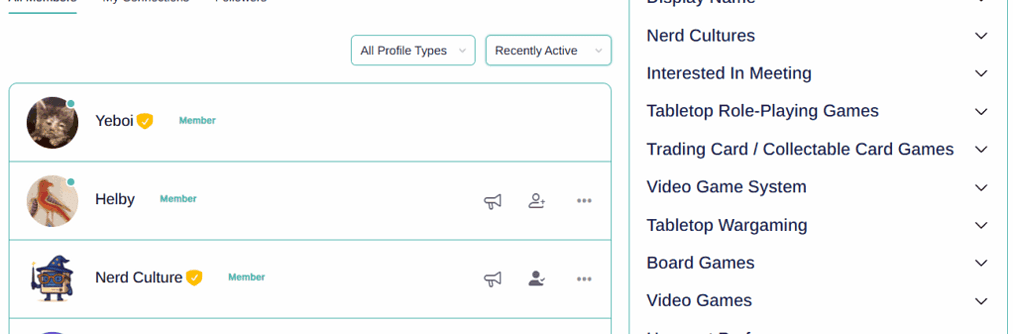
A Discord Alternative Built Around You
Discord connects you to servers. Nerd Culture connects you to people. Use Member Search to find friends who align with your exact interests, local or online.
Why is Discord so important?
Platforms like Discord have become so important to many people’s lives because they offer users a quick, intuitive and accessible way to chat with people around the world in real-time.
Before tools like Discord became widely available, remote communication was only really made possible via phone calls and email messaging. Of course, both are better than letters, but they also come with some pretty big limitations in terms of practicality and convenience.
Nowadays, thanks to modern team messaging tools and chat apps like Discord, people all around the world can engage in continuous conversations with their friends and colleagues from any computer or smart device. Sites like Discord can run all the time in the background while users tend to other tasks, allowing for simple and streamlined real-time conversations.
Whether you’re running a business or simply keeping in touch with your friends, Discord and alternatives to Discord empower you to keep on top of things at all times. In an increasingly connected society where things like remote work and long-distance friendships are the norm, team messaging tools and chat apps play a vital role in building and sustaining communities.
The best Discord alternative for community-building
Discord’s immense and ongoing popularity is testament to the importance of live messaging and chat apps to modern society, but that’s not to say that the service is without its problems.
Whether you’re concerned about privacy, tired of paying subscriptions or simply looking for a tool that better-meets your needs, there are plenty of Discord alternatives worth considering.
One of the biggest issues users face when using Discord today involves finding and building real connections with like-minded people. If you’re looking for a Discord alternative that offers a safe, fun and effective way to not only build a community, but grow it together with the right people, Nerd Culture will be the platform for you.