


How to Promote Your YouTube Channel for Free
Promote your YouTube channel for free through hobby communities, Reddit, Discord, Pinterest, and more. Find interested viewers and share without spamming.

You finished the video. The audio is finally right, the thumbnail is ready, and the upload is live. Now comes a different problem: finding people who would actually enjoy watching it.
Learning how to promote your YouTube channel for free starts with the subject of your videos. A miniature-painting tutorial belongs in front of people painting miniatures. A Commander deck guide needs players who enjoy discussing card choices. An invitation to “support my channel” gives those people much less to work with than a useful answer to something they care about.
You can share that answer without buying ads. YouTube’s own promotion guidance recommends sharing videos through relevant websites, forums, newsletters, and social platforms. The challenge is choosing a few places that fit your work and giving people a reason to follow the link. This guide covers free sharing options, what to look for in a platform, what to say when you post, and how to tell whether the effort is worthwhile. Free means no advertising spend for these approaches. It still takes some of your time.
Start with the person who would watch this video
Before you decide where to promote a video, finish this sentence: “This is useful or enjoyable for someone who…”
Be specific. “Likes gaming” could describe a person watching competitive shooters or someone trying their first tabletop RPG. “Is running their first D&D session and needs help explaining combat” gives you a clearer audience.
For an entertainment channel, the answer might be “enjoys chaotic cooperative games with friends.” A channel about costumes might serve people attempting a particular sewing technique. Your next video does not have to appeal to everyone who could eventually subscribe. Use that description to look for relevant conversations. Read recent posts before joining in. Are people discussing the same kinds of projects, games, or questions? Do they respond to each other? Is sharing your own work welcome? Start with one video and two suitable communities. That is a manageable experiment, and it leaves you time to answer the people who respond.
What to look for in a place to promote your YouTube videos
A large audience is not necessarily the right audience. Before investing time in a platform, look at how people find content, what kinds of conversations happen there, and whether creators can share their work without interrupting those conversations. Some hobby apps combine interest-based discovery with group discussions and event planning, giving creators additional ways to connect with their audiences.
Find communities that match your subject
Look for active hobby and social groups where people already discuss the topics you cover. A board-game reviewer might find a group choosing games for its next meetup, while a cosplay creator could join a discussion about armor assembly. Read recent posts and replies to see whether people exchange advice and welcome contributions from creators.
Give members something useful even if they never click your link. A maker could share a photo of a finished dice tray, explain how they solved a tricky corner joint, and link to the full tutorial where permitted. A book reviewer might invite discussion about a character or theme explored in their video.
Check how content is shared and discovered
Look at whether people find posts through topic searches, groups, followed accounts, recommendations or a combination of these. A feed based on chosen interests may suit ongoing conversations, while recommendation-driven feeds can help introduce your work to new viewers. Neither guarantees that people will see or watch your videos.
Consider whether public posts remain accessible through direct links or search engines. A useful tutorial discussion may be relevant months later, but public visibility does not guarantee indexing or search rankings. Private communities can still be valuable for candid feedback and ongoing relationships. Check each platform’s privacy settings and access rules.
Look for clear rules about self-promotion
Read the platform and group guidelines before sharing. Some communities welcome relevant tutorials and reviews, while others restrict links to designated threads or prohibit self-promotion altogether. Be transparent that you made the video, and avoid spaces built primarily around exchanging views or subscriptions.
Find ways to connect between uploads
Consider whether the platform gives people a reason to return beyond your latest video. Group discussions, project updates and events can help viewers participate in the hobby itself. A miniature-painting creator might invite people to share their current projects, while a photography channel could organize a photo challenge.
You do not need to maintain a community on every platform. Start with a place where you would enjoy participating even if you had no new video to share, then see whether it leads to useful conversations and interested viewers.
Give Your YouTube Audience a Place to Connect
As Seen On:









Places to promote your YouTube videos for free
Different platforms suit different kinds of sharing. Use the criteria above to decide which of these options fits your subject, preferred way of interacting and available time. Free posting does not mean every community welcomes promotion.
Compare free YouTube promotion platforms
| Platform | Audience relevance | Content discovery | Self-promotion rules | Community building |
|---|---|---|---|---|
| Nerd Culture | Hobby communities | Member-controlled feed; public posts may be indexed | Relevant links allowed; no spam or systematic redirection | Creator groups, discussions, events |
| Niche subreddits | Search, feeds, public threads | Varies by subreddit | Threads and subreddits | |
| Discord | Interest-based servers | Within servers; limited public visibility | Server rules; no bulk spam | Servers and live conversations |
| Facebook Groups | Hobby and local groups | Group search; public posts may be visible externally | Admin rules and approvals | Groups, discussions, events |
| Visual and DIY audiences | Search and recommendations | Relevant destination links; no spam | Boards and follows | |
| Bluesky | Topic-focused audiences | Following, Discover, custom feeds | Relevant links; no spam | Replies and follows |
| YouTube Shorts | Topic-relevant viewers | Shorts feed and search | Related-video links require advanced access | Comments and subscriptions |
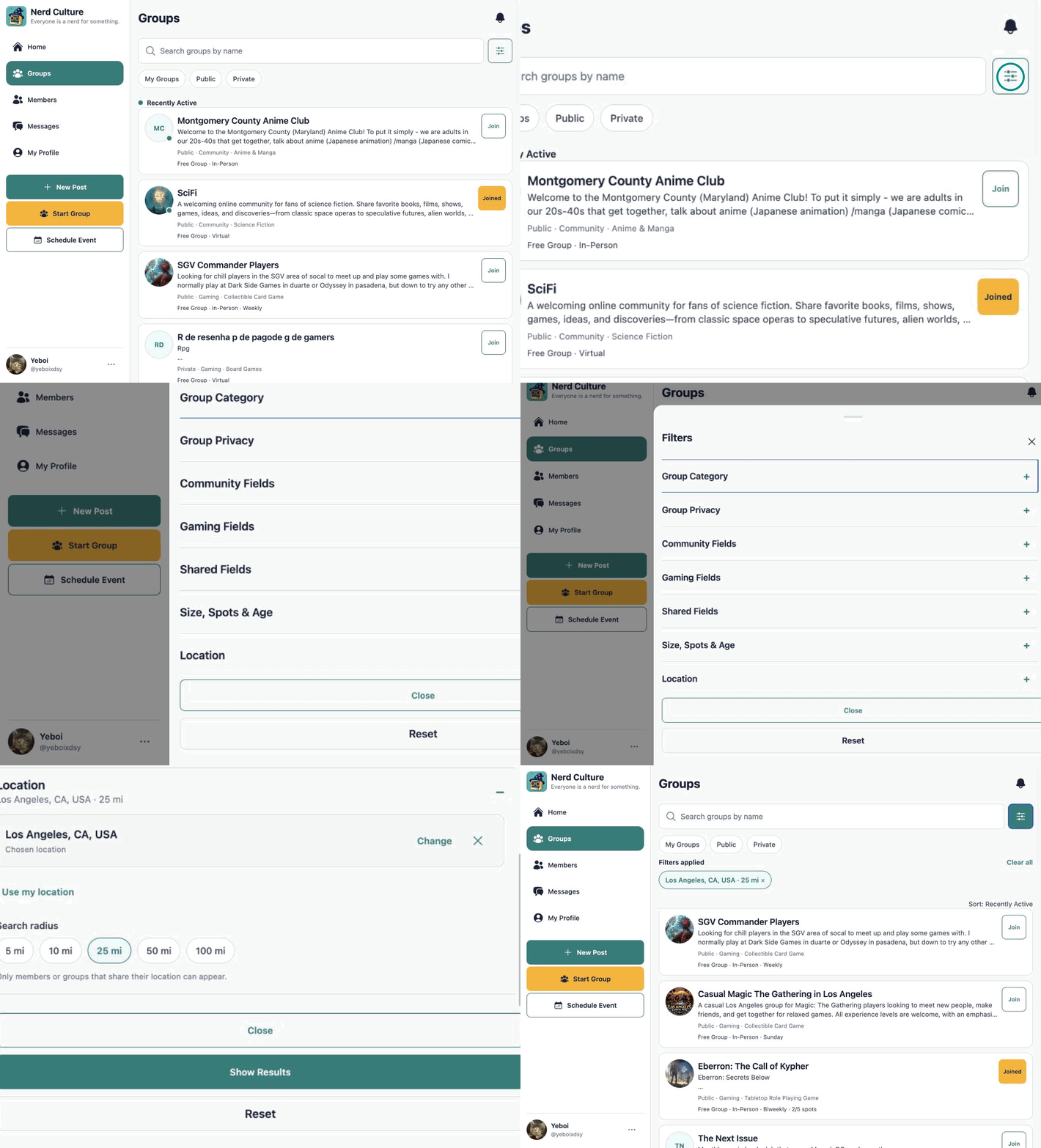
Nerd Culture: connect through shared hobbies
Nerd Culture is a free hobby and community platform where creators can find people, join interest-based groups or build their own communities. Check how active groups are in your niche before investing time.
There is no engagement-ranking algorithm to compete against in Nerd Culture’s member-controlled feed. Public community posts may also be indexed by search engines, giving useful discussions a chance to be discovered long after publication.
Share something that contributes to the hobby: a board-game teach-through, a dice tray tutorial, a cosplay armor build or a character makeup comparison. Include a useful tip, photo or question alongside your video rather than simply announcing an upload.
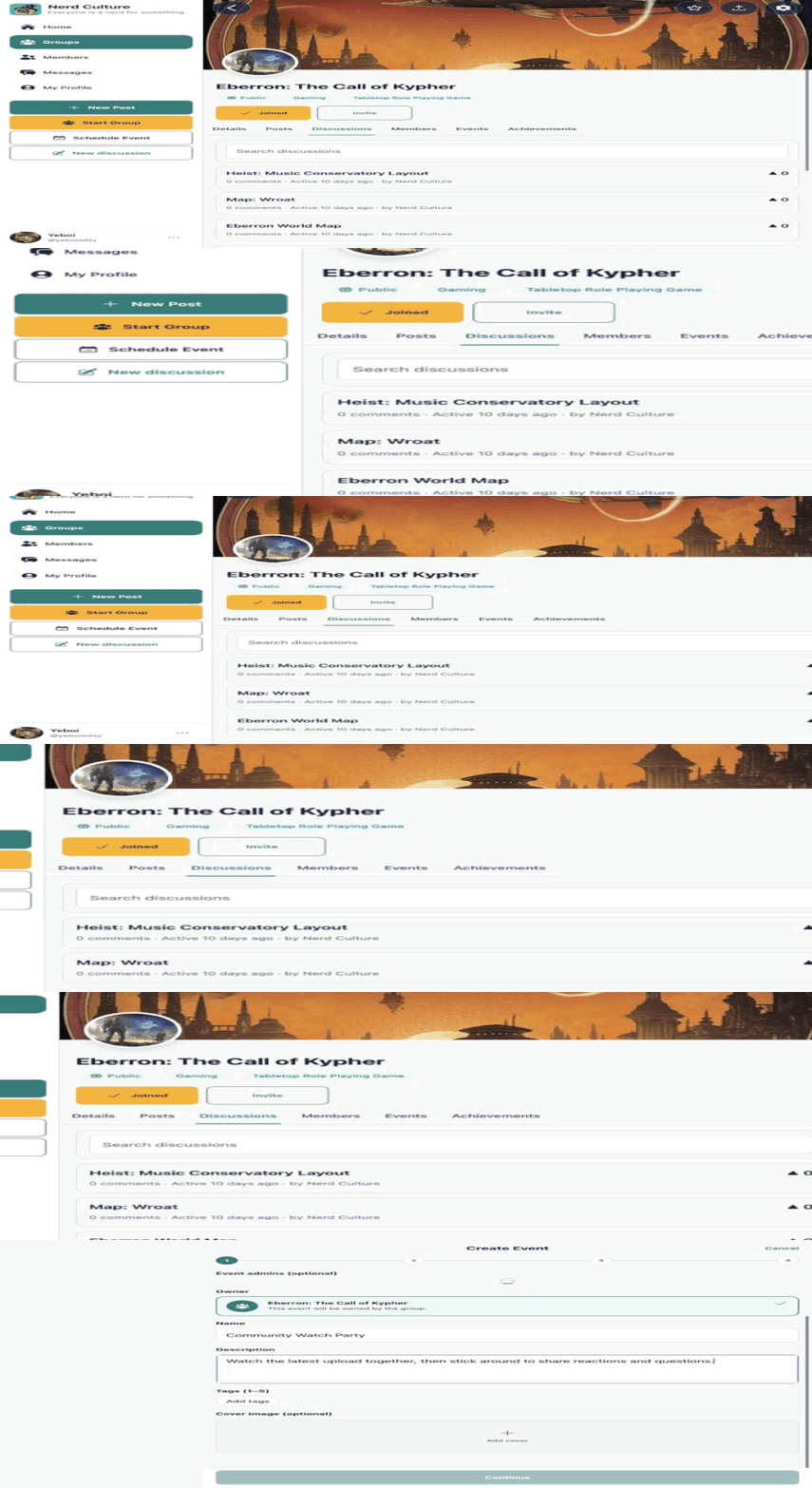
Keep the conversation going between uploads through groups, discussions and events. Invite miniature painters to share their current models, organize a board-game night or ask fellow GMs how they handled a situation from your latest video. Nerd Culture gives you the tools to build a creator community where fans can share projects, discuss your videos and stay connected between uploads. Nerd Culture can serve as a one-stop shop for managing your community, bringing group administration, member management, discussions, messaging and events together so you do not need separate platforms for these everyday tasks.
To get started, create a free profile, select Content Creator as your profile type, describe what you make and find a relevant group. For a deck-building video, you might post: “I filmed a guide to upgrading a starter deck while keeping most of the original cards. Which card from your starter deck has earned a permanent place in your list?” Include your video link where permitted and respond to replies.
Nerd Culture’s Code of Conduct allows relevant promotion but prohibits aggressive spam. Its Terms of Use restrict using the platform primarily to funnel members elsewhere. Treat the community as a place to participate, not just a source of clicks.
Reddit: contribute to a specific discussion
Reddit is worth exploring when your video addresses a question people are already asking. Look for communities related to your subject, then read the rules and recent discussions before deciding whether your video belongs there.
Reddit’s spam guidance discourages repetitive mass promotion and leaves community moderators to apply their own rules. Some communities allow creators to share their work in designated threads. Others do not allow self-promotion. A thoughtful post still needs to follow those rules. When a video is relevant and allowed, include a useful written explanation and disclose that you made it. Someone asking how you built a piece of terrain should get enough information to understand the approach without being forced to watch first.
Avoid posting the same link across a string of barely related communities. Choose the discussion where you have something to contribute and stay for the replies.
Reddit’s access model is also changing. In October 2026, Reddit said it would begin testing a primarily logged-in experience in selected countries outside the US. It intends to keep shared posts and search-result links useful to visitors, and the boundaries of those tests are still being worked out. If you use Reddit to share a hobby video, treat it as one useful conversation channel rather than the only long-term home for your audience. If Reddit’s community rules or changing access model don’t suit your channel, other Reddit alternatives offer different ways to participate in topic-focused discussions.
Discord: share where the server welcomes it
Discord can suit creators who enjoy ongoing conversations with a particular gaming or hobby community. Look for an appropriate project, tutorial, or creator-sharing channel rather than assuming the general chat welcomes promotion. Discord’s guidance on server rules specifically discusses advertising restrictions and channel-specific exceptions. When the rule is unclear, ask a moderator before posting.
A cosplay tutorial, for instance, could belong in a costume-building channel where members exchange techniques. Include a photo of the result or a short explanation of the problem the video addresses. Do not message everyone in the server with a link. Discord prohibits unsolicited bulk messages. Running your own server is another option, but it gives you a place to host a community, not an automatic supply of new viewers. Consider whether you have the time and interest to maintain it. If maintaining a Discord server takes more time than you can commit, some Discord alternatives combine community discovery, discussions and group management.
Facebook Groups: find the right hobby circle
Search for groups centered on the hobby your channel covers. For a board-game video, that might mean a group discussing games for families or a local club planning regular meetups. Treat these as possible audiences to investigate, not guaranteed places to advertise.
Read the group’s rules and any pinned guidance about sharing your own work. Meta gives administrators tools to establish and enforce group rules, so permission can vary from one group to another.
Where sharing is welcome, explain the relevance. “I filmed a teach-through of the game we discussed last week” is more useful than “New upload, please watch.” Check back for questions, especially when your video was intended to help someone learn.
Facebook’s public groups are not the same as private ones. Meta says new posts in public groups can be seen even by people who do not use Facebook; private groups limit that access to members. In practice, your ability to post and participate also depends on each group’s settings and moderation. There is value in sharing where your fellow hobbyists already gather, alongside building a community of your own that interested people can seek out directly.
Pinterest: give a visual project a useful destination
Pinterest is an option to test when a picture can show why someone might want your tutorial. Consider a finished costume piece, a painted miniature, or a DIY gaming accessory rather than a generic graphic announcing a new upload. Pinterest supports image and video Pins with destination links. You can use that link to send interested people to the corresponding YouTube video.
Make the Pin specific to the project. “Foam shoulder armor: pattern and assembly” tells someone what they will learn. Choose an image that accurately represents the result, and use the title and description to explain the tutorial. The destination should deliver what the Pin promises.
Bluesky: share your work through conversation
Bluesky offers a chronological Following feed as well as Discover and custom feeds. It also supports profile links, giving you somewhere to make your YouTube channel easy to find. Try sharing an observation from the video alongside its link. A fantasy-book discussion might begin with the character choice you disagree with. A maker video could start with a photo of the prototype that did not quite work.
Spend some time finding people who discuss your subject and replying to work you genuinely enjoy. Bluesky’s feed choices offer another approach to finding conversations. As with the other options here, you still have to find an audience that matches your work.
Help New Viewers Discover You
- Find people who share your channel’s interests.
- Help new viewers discover your group and content.
- Share video updates and invite fan feedback.
Use YouTube Shorts to introduce a longer video
You do not have to leave YouTube to promote a video. A Short can give viewers a self-contained sample of a longer tutorial or discussion. Choose a moment that makes sense on its own: demonstrate one brush technique, explain one card interaction, or show how a prop changed between two stages of a build. Let the Short deliver something useful before inviting viewers to the full video.
YouTube allows eligible creators to add a related video to a Short. This requires advanced feature access, and the selected video must be on your channel and public or unlisted. Viewers get a clickable link in the Shorts player.
That is different from pasting a URL into the description. Links in Shorts descriptions and comments are not clickable. Use the supported related-video feature rather than giving viewers a link they cannot tap.
What should you say when you share a video?
Give people enough information to decide whether it is for them. A useful post usually identifies the subject, explains what the video offers, and leaves room for a relevant response. You do not have to end every post with a question, but you should be available when someone has one.
Here are two illustrative examples to adapt rather than copy word for word.
For a miniature-painting tutorial: “This is the cloak from my latest painting session. I recorded the steps between the base coat and the finished highlights, including the stage where it looked much too bright. The full walkthrough is here. I’d be interested to see how other people tackle this color.”
For a first-session D&D guide: “I made a walkthrough of a first combat encounter for new players. It follows one turn at a time, with pauses to explain the choices. It’s intended for groups learning together rather than experienced players looking for advanced tactics.”
Notice what those posts do not require: pretending someone else made the video, asking strangers for a favor, or making an enormous claim about the result. The subject and explanation do most of the work. Use your own images and footage, identify the video as yours, and follow the community’s rules. If someone points out a mistake, acknowledge it and correct what you can. Those interactions are part of how people get to know the person behind the channel.
Make one video easier to explore
When someone arrives from another platform, help them understand what else your channel offers. Give the video a title that describes its subject accurately. Make the opening deliver on the reason you shared it, rather than spending a long time asking for subscriptions before the useful part begins. Group related videos into a playlist. YouTube recommends organizing playlists by theme so viewers can find more of your work. A beginner painting series or a sequence of board-game explanations gives a newly interested viewer a clear next choice.
You can also reach out to a creator whose work complements yours. A terrain builder and a miniature painter could each contribute to the same tabletop scene. Propose something specific and manageable, including who would make what. A collaboration should give both audiences a worthwhile video, rather than existing only to exchange shout-outs.
Keep Fans Engaged Between Uploads
- Host Q&As, watch parties and project discussions.
- Manage groups, admins and events in one place.
- Use fan feedback to plan your next video.
Plan for your next upload
Choose one completed video and write down who it is for. Prepare a brief explanation, its link, and one image or excerpt that helps show what someone will get from watching.
Share it in one suitable hobby community where your work is welcome. Adapt the introduction to the conversation there. Later, try one other relevant place or create a Short using a useful moment from the video. Leave time between those tasks to answer replies.
Keep a simple record of where you posted, what you said, and what happened. Did someone ask a question? Did the discussion reveal something your video left unexplained? Did the people who arrived appear interested in the subject?
There is no need to turn every upload into a week of promotional chores. A routine you can sustain alongside making videos is more useful than an ambitious checklist you abandon after one attempt.
Check whether the promotion is reaching interested viewers
In YouTube Studio, open a video’s Analytics and look at Reach. YouTube’s external traffic reporting shows websites and apps that sent viewers through links or embedded videos. Some visits appear as direct or unknown, so the report will not attribute every visit perfectly.
Review views alongside watch time and average view duration where the relevant breakdown is available. Also note the responses you received in the community itself. A detailed question about the project can tell you something useful even when the referral numbers are small.
Treat early results as clues. One post is not enough to decide that a platform works for every video, and an external view is not automatically a new subscriber. Look for patterns across several uploads before committing more time.
Avoid subscriber swaps and guaranteed-view offers
Free promotion should help people discover something they choose to watch. Avoid services or groups that promise subscribers in exchange for subscriptions, automated views, or other artificial engagement.
YouTube’s fake engagement policy prohibits artificial metric inflation and “sub4sub” arrangements. Asking an interested viewer to subscribe is allowed. Trading subscriptions with people who have no interest in the videos is a different proposition.
YouTube’s own Promote feature is also a paid advertising tool. It is separate from the free sharing approaches covered here.
Give people a reason to watch, and a place to talk
You can promote your YouTube channel for free without treating every conversation as a chance to drop a link. Pick a video you are proud of, find the people who might enjoy it, and explain why it belongs in that conversation.
For hobby creators, Nerd Culture offers a place to keep that connection going. Share what you are making, meet people interested in the same subject, and build a group where members can contribute their own work and ideas. Learning how to build an online community can help you plan what happens between uploads.
Build Your Creator Community
FAQs for promoting your YouTube channel for free
How can I promote my YouTube channel for free?
Start with one video and identify the people most likely to enjoy it. Share a useful tip or example in one or two relevant hobby communities where promotion is allowed. Repurpose a useful moment as a YouTube Short, organize related videos into playlists and collaborate with creators whose audiences share your interests. Focus on attracting interested viewers rather than exchanging subscriptions or buying views.
Where can I promote my YouTube videos for free?
Nerd Culture, Reddit, Discord, Facebook Groups, Pinterest and Bluesky all offer ways to share videos without paying for advertising. Choose based on your niche: Pinterest suits visual tutorials, while hobby groups and discussion forums are useful for answering specific questions. Check each community’s promotion rules before posting, and test a couple of platforms before committing to more.
How can I promote my videos without spamming?
Read the community rules and look for discussions your video can genuinely help with. Give readers a useful explanation, image or tip before including your link, and disclose that you created the video. Avoid posting identical links across unrelated groups or sending unsolicited bulk messages. Return to answer questions and participate even when you have nothing new to promote.
Can YouTube Shorts help promote longer videos?
Yes. Choose a short, self-contained moment from a longer video that demonstrates a technique or answers a question. Creators with advanced feature access can attach a related video from their own channel, provided it is public or unlisted. Viewers can then tap the related-video link in the Shorts player; ordinary URLs in Shorts descriptions and comments are not clickable.
How can I build a community around my YouTube channel?
Give viewers a dedicated place to interact between uploads. Create a group around the interests your channel covers, invite members to share projects or questions, and organize occasional Q&As, watch parties or hobby events. Use their feedback to plan future videos, set clear group rules and invite trusted members to help moderate as the community grows.
How do I know if my free YouTube promotion is working?
Open the video’s Analytics in YouTube Studio and check the Reach tab for external traffic sources. Compare views with watch time and average view duration where those breakdowns are available, rather than judging success by clicks alone. Keep track of which communities generated useful questions or feedback, and compare patterns across several uploads. Some visits may be reported as direct or unknown.
About the Author
Steven Weingarth (aka ShibaSteve) is co-founder and CEO of Nerd Culture. Between D&D, board games, science fiction novels, and his dogs, Steven has never been short on hobbies. What he could never find was an app that actually tracked his groups, not just his own activity, and helped them stay together over time. He’s tested a plethora of different hobby apps, and kept hitting the same gap. That’s what led him and his co-founders to build Nerd Culture.
Content last updated: November 25, 2026