
Best D&D Note-Taking Apps and TTRPG Organization Tools
Compare D&D note-taking apps and learn how to organize recaps, private notes, group decisions, recurring sessions, and open seats.
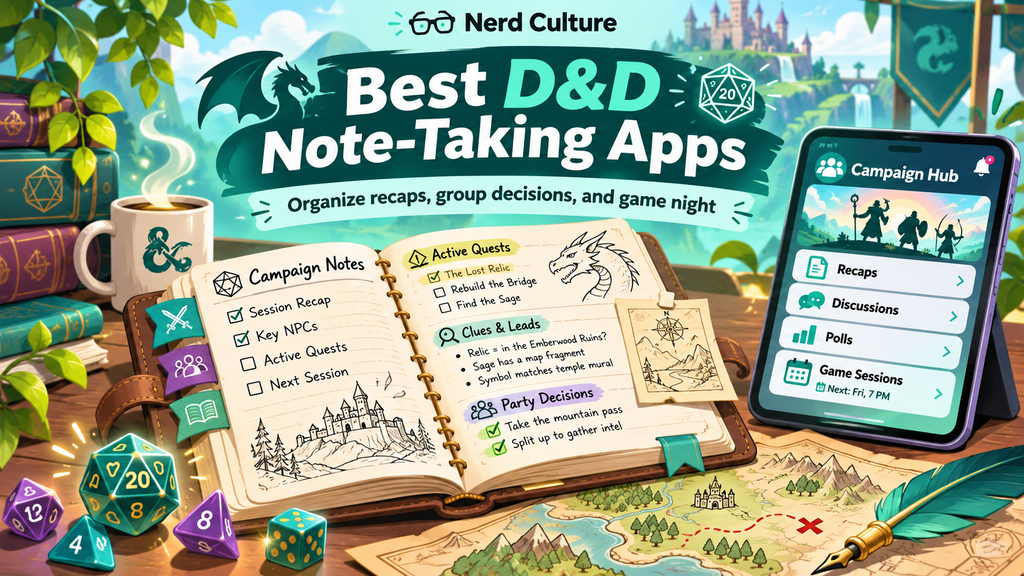
Your party remembers that the innkeeper was hiding something. Nobody remembers what. The clue is somewhere in Session 6, the next game date is buried in chat, and the player who missed last week is asking for a recap. A good D&D note-taking app solves the first problem. A good campaign organization system helps solve the rest.
The best setup depends on what your table needs: quick session notes, a searchable worldbuilding library, AI-assisted recaps, or one shared place to keep the game and the players connected. We looked at established note-taking and campaign tools, then considered what happens after the notes are written. The answer is not necessarily another enormous database. It might be a simple notebook and a better way for your group to use it.
The best D&D note-taking apps and group organization tools at a glance
These tools serve different purposes. Some are excellent private notebooks or campaign wikis. Others help a group act on the information. Use the comparison to find a fit, not a universal winner. Nerd Culture publishes this guide and is included as a group-centered option; the product distinctions below are editorial, not results of a controlled head-to-head test.
| Tool | Best for | Useful strength | Know the tradeoff |
|---|---|---|---|
| Google Docs | Quick shared recaps | Collaborative editing and simple documents | A long campaign needs manual indexing |
| OneNote | Flexible notebooks | Ink, sketches, sections, and pages | Less structured world linking |
| Notion | Custom dashboards | Linked databases for sessions and NPCs | Setup and maintenance take attention |
| Obsidian | Private linked notes | Local files and connected campaign knowledge | Sharing takes separate planning |
| Kanka | Campaign wiki | RPG entities and role-based visibility | Not primarily a real-life scheduling hub |
| LegendKeeper | Map-led worldbuilding | Location-linked lore and secrets | Less focused on group logistics |
| Crit Scribbler | AI session capture | Discord-based recaps and transcription | Consent and human review are essential |
| Nerd Culture | All-in-one game group | Notes, posts, discussions, polls, recurring events, open seats | Not a dedicated deep-lore wiki or VTT |
What kind of campaign organization do you actually need?
Before you pick an app, separate three jobs. First, capture what happened: names, discoveries, promises, loot, and loose ends. Second, make that information findable: who was the masked patron, which town owes the party a favor, and where is the last recap? Third, coordinate people: decide what to do next, confirm a date, and make room for someone new.
A player might only need short chronological notes. A DM with a sprawling homebrew setting might want linked NPCs, locations, and secrets. A group playing every other Thursday may need fewer lore pages and a reliable way to discuss the story between sessions. You can combine tools, but every extra place to check becomes another habit someone has to maintain.
Ask four practical questions: Can everyone find the last recap from a phone? Can the GM keep unrevealed information private? Where do group decisions live? If a player misses two sessions, could they catch up before the next one without asking for an hour-long explanation?
The best D&D note-taking apps for different tables
Google Docs: the simplest shared session log
Google Docs is a sensible starting point when the goal is to write down what happened and let the rest of the table read or contribute. Create a document for each session, add a heading for important discoveries, and maintain an index linking to recaps. Shared editing makes it easy for one player to record the combat highlights while another remembers the conversation with the town guard.
The tradeoff appears as a campaign grows. An NPC named in Sessions 2, 7, and 19 is still scattered across documents unless someone organizes those references. Docs is strong at collaborative writing, not inherently a campaign encyclopedia or group scheduling hub. For a short adventure or a table that values simplicity, that can be perfectly fine.
OneNote: familiar notebooks for messy, visual prep
OneNote suits the DM whose notes include sketches, handwritten maps, clipped material, and quick lists. Organize a notebook by campaign, with sections for sessions, characters, and locations, then use pages to keep related information together. Microsoft’s digital ink and sharing features are especially relevant when someone is already comfortable working on a tablet.
Its loose-page approach can feel more natural than building a database before Session 1. The downside is that relationships between story elements still depend on how you organize pages and links. OneNote handles a notebook well; it does not replace a system for recruiting players, running group votes, or hosting the ongoing conversation.
Notion: a customizable campaign dashboard
Notion gives system-minded DMs room to build a workspace where sessions, NPCs, locations, and quests connect. A session page might link to a character record, which links to the faction that hired them. Notion’s database relations can make that structure useful when a long campaign has accumulated dozens of names and unfinished threads.
That flexibility is also the main cost. Somebody has to design the structure, manage access, and keep it updated. A player who only wants to read last session’s summary may not care about your beautifully organized database. Choose Notion when your group will actually use the extra structure, not because every campaign supposedly needs one.
Obsidian: linked notes and ownership of your files
Obsidian is compelling for GMs who like the idea of a personal campaign vault. Each note can link to other notes, so a tavern points to its owner, the owner’s rivals, and the forgotten promise the party made three sessions ago. The local-file approach also appeals to people who want direct control over their writing and an offline-first workspace.
A private vault is not automatically a shared player hub. Obsidian offers separate ways to synchronize or publish material, but a GM still has to decide what to share and how. If you enjoy building a network of world knowledge, it rewards that attention. If you simply need everyone to confirm Thursday, you are solving a different problem.
Kanka: a campaign wiki built for RPG worlds
Kanka is designed around campaign information rather than a generic notebook. It offers linked entries for characters, places, organizations, calendars, and other parts of a setting, with role-based permissions for sharing details with players. It can be a strong choice when the DM needs to manage who knows what and keep a sizable world from becoming a pile of disconnected pages.
The distinction is what its calendar means. An in-world calendar can record the festival when the duke disappears, but that is not the same as making sure six real people can play that evening. If your table needs extensive worldbuilding, Kanka belongs on the shortlist. Pair it with a clear group coordination process where necessary.
LegendKeeper: worldbuilding that starts with the map
For campaigns where the geography matters, LegendKeeper offers a different way into the lore. Link information to locations and move from a map to the stories, people, and secrets attached to each place. That is valuable for a sandbox campaign whose characters may choose any road out of town.
LegendKeeper’s appeal is the campaign world itself. A map-led wiki can be wonderful for preparing and exploring a setting without becoming the central conversation space for everyone playing it. That is a question of fit, not a flaw. A powerful world reference and a useful group home can coexist.
Crit Scribbler: AI-assisted notes for Discord sessions
If your group runs sessions through Discord and nobody wants to be the designated scribe, Crit Scribbler approaches the problem through automated capture. Its Discord bot produces session notes and recaps, along with extras such as memorable quotes. This is a different category from manually maintained notebooks and wikis.
Treat AI notes as a draft to check, not an unquestionable record of what happened. Character names, plot twists, and who promised what still deserve human review. Talk with everyone before recording a session, and check the provider’s current consent, retention, and deletion options. Automatic capture can reduce typing, but it cannot replace the group’s judgment about what should be shared.
What the data says about notes and game-night planning
The 2026 Daggerheart GM survey from The Dispatch offers a useful snapshot of how an active TTRPG audience handles these jobs. Among respondents who answered its note-taking question, 27.5% chose Google Docs and 23.5% chose Obsidian. For arranging sessions, 55.9% selected group messaging and 22.1% selected Discord Events. The survey collected 987 voluntary responses in September and October 2026 through a Daggerheart-focused publication and subreddit. It was not a representative survey of every D&D table.
Those figures do not prove any one app is better. They do underline a familiar reality: campaign notes and session logistics often happen in different places. The question worth asking is whether that separation helps your group, or whether it makes the next bit of information harder to find.
Free D&D note-taking tools
Bring your notes, conversations, and game nights together in Nerd Culture.
- Keep session notes, recaps, and ideas in one place
- Control who sees each note and discussion
- Give theories their own discussions and polls
- Automate recurring game nights with session details
Nerd Culture: one home for notes, group decisions, and game night
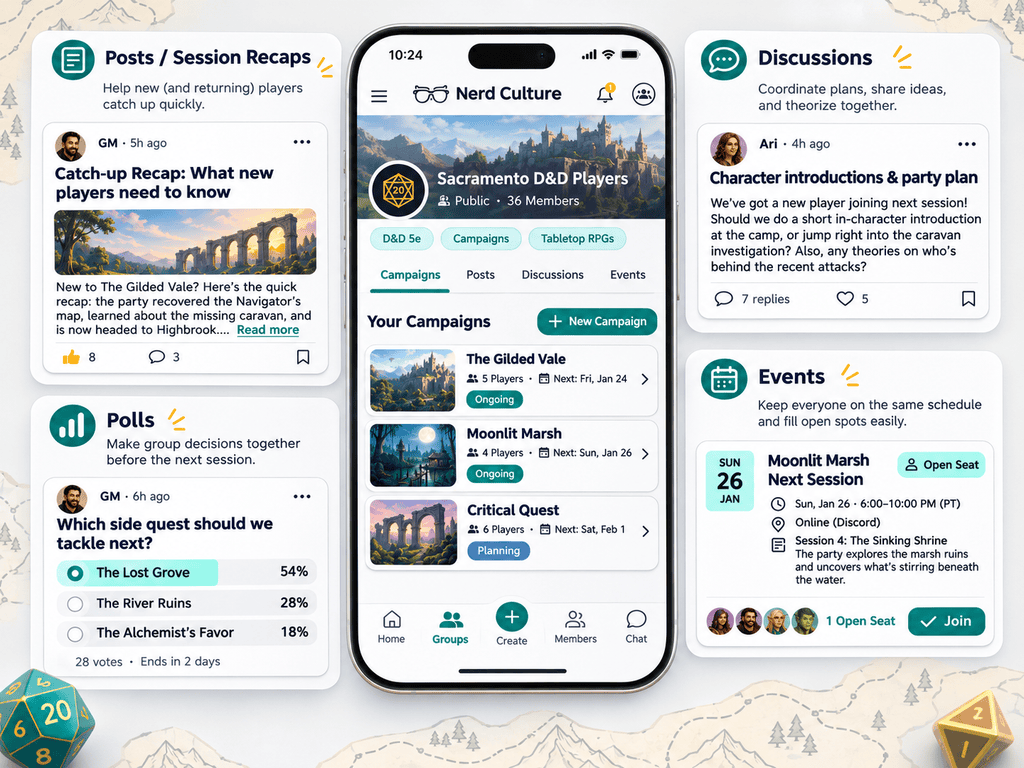
A notebook helps you remember the campaign. Nerd Culture is built for the people playing it. As an all-in-one group option, it brings note sharing, posts, conversations, voting, member organization, event planning, and group discovery into the same community space. That can be enough for a table that would rather spend its time playing than maintaining a collection of apps.
Nerd Culture is the publisher of this article, so it is worth being precise about what the recommendation means. We are not suggesting that its posts replace Obsidian’s linked vault, Kanka’s world encyclopedia, or a virtual tabletop. The stronger argument is that the group can keep its shared story and the decisions around that story in one place, while still using a specialist tool when it adds value.
Keep session notes useful and control who can read them
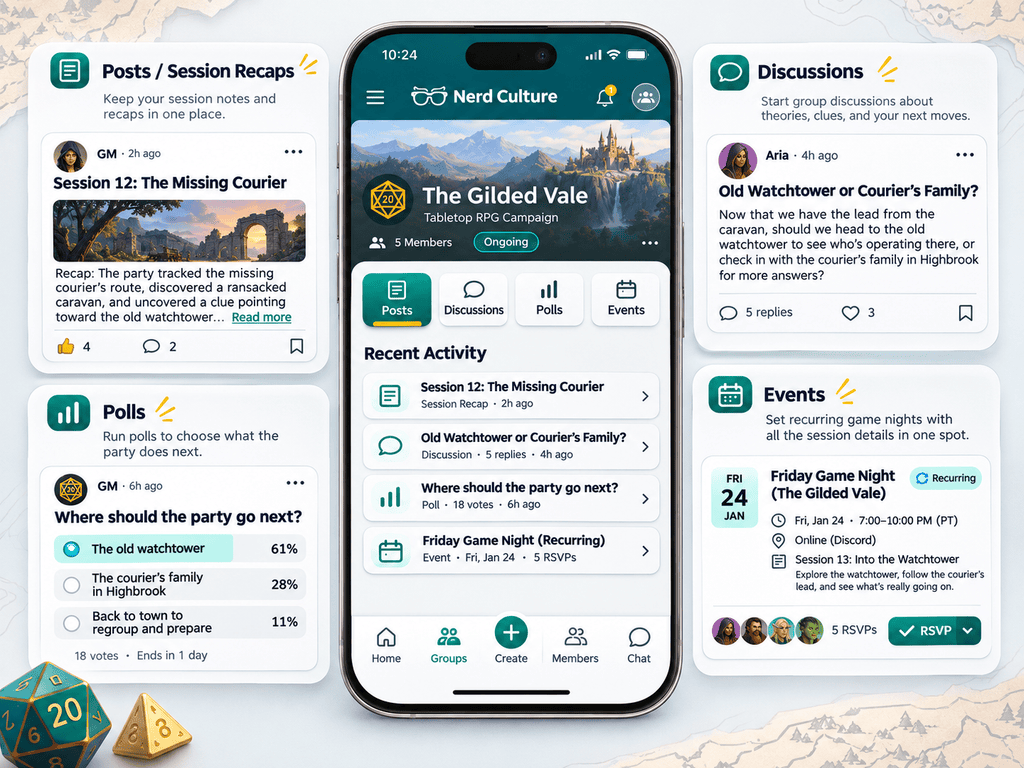
A recap can live as a group post. Give it a consistent title such as “Session 12: The missing courier,” summarize the major events, and include unresolved threads that players can act on before the next session. Separate posts and discussions let you keep the running story visible without mixing every theory, scheduling message, and character joke into the same thread.
Not everything belongs in a public recap. Nerd Culture supports GM-only notes and user-level visibility permissions inside a group, so the organizer can keep unrevealed details or character-specific information from appearing to the wrong audience. A clue for one player, the villain’s unrevealed motive, and the shared recap should not all have the same visibility. Check each post’s audience before sharing it, especially when it contains spoilers.
Let the story continue between sessions
Suppose the party ends the night facing two leads. One points toward the old watchtower, the other toward a missing courier’s family. Instead of waiting until everyone sits down again, the GM can open a discussion, let the characters argue their case, and use a poll to choose the next direction. Another post might be a character’s journal entry, a tavern rumor, or a sketch of the symbol found on the dungeon wall.
These conversations give players space to participate at their own pace. Nobody has to perform an extra session of roleplay between game nights. The benefit is that the group’s ideas, votes, and resulting decisions remain tied to the game instead of disappearing into a stream of unrelated messages.
Set recurring sessions without rebuilding the event each time
If your campaign meets every other Saturday, recurring-event automation makes it possible to establish that rhythm rather than creating the same game-night entry from scratch repeatedly. The group can use its event information for the date, time, location or online setting, and RSVP details. For special sessions, a separate event can clarify the change rather than relying on everyone noticing a buried message.
A recurring date is not a guarantee that everyone will attend, and automation does not mean the app secretly resolves conflicting calendars. The practical advantage is a consistent place to check the plan and discuss exceptions. A player joining after several weeks can see the upcoming session context instead of asking someone to resend it.
Open a seat and help a new player catch up
Campaigns change. A player relocates, someone needs a break, or a group decides it has room for one more character. Instead of rebuilding the group listing from scratch, a Nerd Culture organizer can open available spots so players looking for a game can discover it. Group details can show the game type, style, experience level, schedule, session length, and number of places, helping a potential member decide whether the table is a fit.
Finding the opening is only the first step. The group description, rules, shared recaps, discussions, and upcoming events give an invited player a way to understand what the campaign is about and how the group plays. A good welcome still matters. A quick introduction from the GM, a player-safe recap, and a clear first-session plan will do more for onboarding than a giant wall of unorganized lore.
Keep several campaigns together without mixing them up
Many DMs run more than one campaign, and plenty of players have a weekly table, a monthly one-shot group, and a game that meets whenever the stars align. Nerd Culture keeps different groups and their conversations accessible from one community account. You can check the event for one table, catch up on another group’s post, and respond to the people in a third without treating all those stories as one enormous thread.
The mobile app also matters here. A recap, poll, or update is useful when you can read it on the way to a session or respond from wherever you happen to be. With access on mobile and other devices, group conversations are not limited to the computer where the GM keeps their campaign notes.
A simple campaign workflow you can use this week
You do not need to migrate years of notes to make a group better organized. Start with one session and make the information easier to find.
Before the game: separate secrets from shared material
Keep private prep, monster surprises, and unrevealed plot threads in a GM-only space or a notebook you control. Put the player-facing premise, table expectations, and next session details where the group can see them. If this is a new campaign, our D&D session prep guide has a compact checklist for what to prepare without writing a novel first.
During the game: capture decisions, not a transcript of every sentence
Write down the names that matter, the choices characters make, clues that might return, resources gained or spent, and promises made. If someone at the table enjoys detailed notes, great. If not, a few useful lines are more sustainable than an elaborate log that nobody updates. Save the full dramatic recounting for moments the group actually wants to revisit.
After the game: publish a short player-safe recap
Use a consistent post format so everyone knows where to look. A missed-session player should understand what changed, what the party knows, and where the action resumes. Put personal clues and unrevealed GM information behind the appropriate visibility settings instead of hiding spoilers in an otherwise shared recap.
Between games: discuss, vote, and confirm
Open a discussion for the unresolved question. If a clear choice belongs to the group, run a poll, then record the result. Keep the recurring event visible and update the group when the plan changes. A player who checks in briefly from their phone should be able to tell what happened last time and what is happening next.
Copyable D&D session recap template
Session [number] | 2026
Characters present: [names]
Last session in three sentences: [the situation, the turning point, the outcome]
Important NPCs and locations: [new names, returning contacts, places to remember]
Decisions and promises: [what the party agreed to, whom they owe, whom they crossed]
Unresolved leads: [questions, mysteries, possible next destinations]
Party resources: [important items, gold, favors, or changes worth tracking]
Next session: 2026
Private GM follow-up: [separate, restricted note for secrets and consequences]
Copy the shared fields into your preferred document or Nerd Culture group post. Keep the private follow-up somewhere with the right permissions. The point is a repeatable record, not an encyclopedia that has to be complete before play can continue.
Which setup is right for your table?
For the lightest approach, begin with a shared recap in Nerd Culture and use its group discussion, polls, and events to keep people coordinated. That gives your table a single home for the day-to-day story and logistics. For a DM who already has years of Obsidian notes, there is no need to abandon the vault: share only the player-facing pieces in the group. If your setting depends on detailed maps, family histories, and interconnected lore, a specialist wiki such as Kanka or LegendKeeper can still do that work.
The useful test is whether the setup survives a missed session, a new player, and a busy month. Could everyone catch up? Can the GM protect secrets? Is the next date obvious? Does one person have to copy the same update into four different places? Choose the smallest arrangement that answers those questions.
Keep sessions and players connected
Give each game a space of its own, with one Nerd Culture account to keep up.
- Open available seats so local or online players
- Help newcomers catch up with shared recaps
- Manage multiple campaigns in one place
- Keep your group engaged in-between games
Frequently asked questions
What is the best way to take notes for D&D?
Capture actions and consequences rather than every line of dialogue. Record important names, decisions, clues, promises, and unresolved leads, then write a short recap after the session. Use Google Docs or OneNote for a straightforward notebook, or a linked tool such as Obsidian when your campaign has grown more complex.
Is there a D&D AI note taker?
Yes. Tools such as Crit Scribbler use automated session capture to prepare recaps and notes, particularly for Discord-based games. Review the output before sharing it, and make sure players agree to any recording. AI-generated notes can be helpful, but they can still misunderstand names, speakers, or the significance of a choice.
Should the DM and players share the same campaign notes?
They should share the information that the characters are meant to know, but not necessarily everything. A public recap and shared NPC list are helpful. Secret plans, unrevealed encounters, and character-specific clues may need separate permissions. Nerd Culture’s group-level visibility controls are designed to support that distinction.
Can one app handle D&D notes, scheduling, and group communication?
Nerd Culture is designed as an all-in-one group option for shared notes and posts, discussions, voting, recurring events, and group discovery. Specialized notebooks and worldbuilding tools may still offer deeper campaign-reference features. The decision is whether your table needs more worldbuilding depth or fewer places to manage the people and the game.
How do you bring a new player into an ongoing campaign?
Make the open spot discoverable, describe the game’s style and schedule, then provide a concise recap of the story so far. Introduce the new player to the group, explain the current situation, and confirm which information is public. If they can find the next session and understand the party’s immediate goal, they can join the conversation sooner.
How do you keep track of several TTRPG groups?
Give each campaign its own group space, recurring schedule, shared recaps, and discussions. Keeping multiple games under one community account can make it easier to switch between them while leaving each story in its proper context. A consistent naming pattern for posts and events helps even when the campaigns use different systems.
Keep the story going, even when the dice are put away
The best D&D note-taking app is the one your table keeps using. For some groups that is a simple document. For others it is a linked vault or a campaign wiki. But the story also needs people who know what happened, when they are playing next, and how to join the conversation.
Nerd Culture gives that part of the campaign a home: shared notes, private details when needed, discussions, votes, recurring game nights, and room for new members when a seat opens. If you are organizing a table or looking for one, explore Nerd Culture’s D&D group finder and start with a group that fits how you actually play.
About the Author
Steven Weingarth (aka ShibaSteve) is co-founder and CEO of Nerd Culture. Between D&D, board games, science fiction novels, and his dogs, Steven has never been short on hobbies.